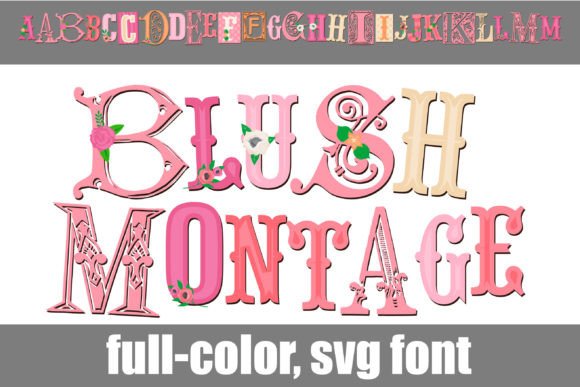
Blush Montage: A Full-Color Font for Modern Projects
When you're working on a project that needs to feel fresh, feminine, and contemporary, the typeface you choose does a lot of heavy lifting. Blush Montage is a full-color SVG font designed to meet that need head-on. It's not just another script or display font; it's a collection of letterforms built in a vibrant pink color palette, each with its own mix of font styles. Think of it as a ready-made design element. The primary characters give you a cohesive look, while the alternate versions—accessible through your system's character map or a program like Silhouette—offer a different color, adding a layer of flexibility right inside the font file itself.
Where This Creative Font Finds Its Place
The strength of a font like Blush Montage lies in its immediate visual impact. It’s a premium font that carries a specific mood: modern, playful, and confident. This makes it a natural fit for projects where the goal is to capture attention quickly and convey a sense of personality. In brand identity work, particularly for boutiques, beauty brands, lifestyle blogs, or female-led startups, it can serve as the cornerstone of a logo design or hero typography. Its full-color nature means the logo arrives with built-in vibrancy, eliminating the need for extra design steps to achieve that polished, colorful look.
For marketing and social media graphics, the font is a workhorse. Instagram stories, Pinterest pins, and Facebook ads thrive on scroll-stopping visuals. Using Blush Montage for a headline or a key call-to-action can inject energy into a static image. In packaging design, especially for cosmetics, stationery, or gourmet treats, it communicates quality and style. The alternates are particularly useful here; you could use the primary pink for the product name and switch to the alternate color for a tagline or secondary text, creating a subtle hierarchy without switching fonts.
It also translates well into editorial design and publishing. Think of chapter titles in a book, pull quotes in a magazine layout, or headers in a digital newsletter. While it’s not a body text font, its role as a display font is clear. For crafters and hobbyists working with cutting machines or digital design software, the alternates are a practical feature. You can plan different colored elements for a project—like a greeting card or party invitation—directly from the font, ensuring color consistency across your design assets.
Making It Work: Practical Font Guidance
Choosing any font, especially a stylized one, requires a bit of strategy. The first question is always about project fit. Blush Montage is a display font at its core. Its detailed, colorful nature makes it perfect for short bursts of text like headlines, logos, and titles. Using it for long paragraphs would quickly become overwhelming and harm readability. The goal is to use it for impact where you have a few words that need to carry the design's weight.
Next, consider font pairing. A complex, decorative font needs a simpler counterpart to create balance and ensure the overall design is legible. Pairing Blush Montage with a clean sans serif font is a classic and effective approach. A geometric sans serif for body copy or supporting information provides a calm, neutral foundation that lets the display font shine. Alternatively, a simple serif font can add a touch of elegance, depending on the project's tone. Avoid pairing it with another ornate script font or handwritten font, as this will create visual competition and clutter.
Always test the font in context. View it at the size you plan to use. Does the detail hold up? Is it still clear at a smaller scale, like on a mobile screen? Check the alternates. Open your character map to see what the secondary color versions look like and how they might be used to solve a specific design problem, like adding emphasis or differentiating information. Finally, if your project is commercial, verify the licensing. A quality commercial font will come with clear terms, and understanding them is part of professional design work.
A Note on Modern Typography Choices
In the landscape of modern typography, full-color SVG fonts represent a significant evolution. They move beyond simple shapes to offer pre-rendered, multi-color designs within a single font file. This is a practical advantage for designers and creators who want complex, polished results without manually layering colors or outlines in their design software. Blush Montage exemplifies this trend, providing a versatile, high-quality font that functions as a complete design asset. Its value isn't just in its appearance, but in its ability to streamline the creative process, allowing you to focus on the bigger picture of your brand's visual story.